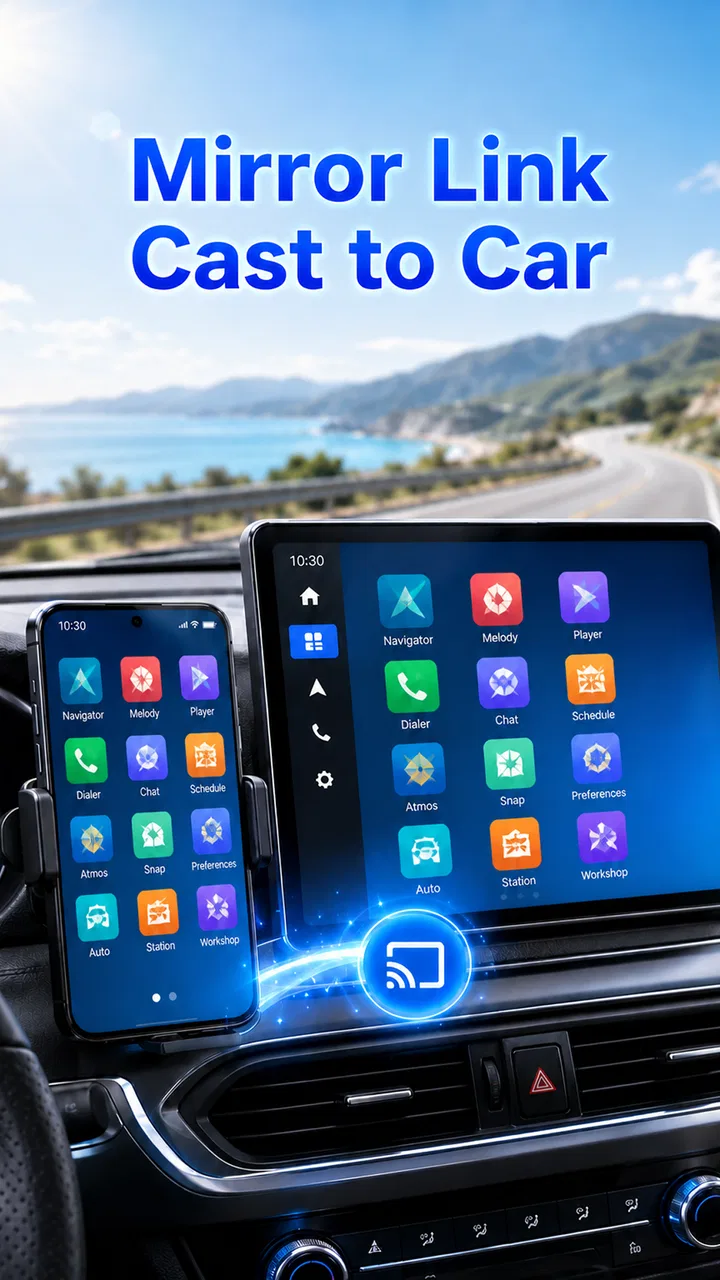
Mirror Link
- 3.2
- Rating
- 1.00M
- Installs
- Free
- Price
 Analysis by App-foxy
Connecting a phone to a car screen sounds simple until the first attempt turns into a search through menus, cables, and compatibility settings. I tested Mirror Link with that practical problem in mind, and my impression is mixed but useful: it is a free app from Flavapp that aims to make phone-to-car-screen mirroring easier, yet its real value depends heavily on the phone, vehicle, and head unit involved. It is not a universal replacement for built-in driving platforms, but it can be worth trying when your car already supports the relevant connection method.
The app sits in the libraries and demonstration part of the Android catalog rather than presenting itself as a full navigation, music, or messaging service. That distinction matters. I would approach it as a connection aid, not as a complete in-car entertainment system. Its store summary focuses on linking a phone with a car display, and that is the right way to understand its purpose before installing it.
What Mirror Link actually offers in everyday use
Mirror Link is listed as a free app, so there is no purchase decision to make before testing it. That is its clearest financial advantage: you can investigate whether it works with your setup without paying for access. I always consider that important with connection tools because compatibility is often the deciding factor, and no description can guarantee that every phone and vehicle combination will cooperate.
You May Also Like

 AccuWeather: Weather Radar
AccuWeather Review: A Quick, Clear Forecast for Everyday Decisions
For everyday plans, the best forecast is the one you can understand quickly. AccuWeather makes rain timing, radar, and local conditions easy to act on, with a few trade-offs.

 Hill Climb Racing
Why Hill Climb Racing Still Turns Crashes Into One More Run
A tiny car, a bumpy hill and one more upgrade: Hill Climb Racing keeps resurfacing because its simple chaos makes every near-miss feel personal.

 AliExpress - Shopping App
AliExpress Makes Global Shopping Feel Personal, but Shoppers Bear the Risk
AliExpress turns a global marketplace into a pocket-sized discovery engine. Its reach is useful, its shopping loop compelling, and its trade-offs easy to miss.

 Lords Mobile: Kingdom Wars
Lords Mobile Is a Kingdom-Building Routine, Not a Quick Match
A case-by-case verdict on the building, battles, device demands, and social commitments that make Lords Mobile rewarding for some players and exhausting for others.

 PDF Scanner app - TapScanner
TapScanner Makes Paperwork Easier to Capture, Check, and Share
TapScanner makes scanning with a phone feel less like a rescue operation and more like a dependable step in getting work done. Its capture tools are useful, though not flawless.

 Block Blast!
 Shows How Much a Puzzle Game Can Leave Out
A quiet grid game shows why puzzle players increasingly value instant clarity, repeatable skill and low-pressure play—and where the genre still needs to catch up.
More From Our News Desk
View All News


The app has been available since August 2020 and is maintained by Flavapp. Its current version is 41.0, while Android devices need at least Android 6.0. Those requirements make it accessible to a broad range of older phones, although operating-system eligibility alone does not prove that a particular car screen supports the connection. In practice, the car’s hardware and software remain just as important as the app installed on the phone.
For a normal user, the first useful question is not “What does the app replace?” but “Does my car already have a compatible mirroring function?” If the answer is no, installing this app cannot magically add a missing receiver to the dashboard. If the answer is yes, the app may provide a convenient starting point for the phone side of the connection. That is a much more realistic expectation than treating it as a universal adapter.
I also like that the age rating is Everyone. That makes the app approachable for families and for people who are not especially technical, although the connection process itself can still require patience. A simple age rating does not mean every step is automatic. You may still need to inspect the car’s display settings, select the correct input, or check whether the phone is using the connection method the vehicle expects.
How I would approach the first setup
I would begin while parked, not at the roadside. First, I would check the vehicle manual or head-unit menu for wording related to phone mirroring, screen sharing, or MirrorLink support. Then I would install the app on the phone that will actually be used in the car. This avoids a common mistake: testing with one device and later assuming another phone will behave identically.
After opening the app, I would keep the car’s screen visible and work through its input options rather than repeatedly tapping the phone. If nothing appears, I would check the cable or connection path, reconnect once, and restart the relevant devices before changing several settings at the same time. That small habit makes troubleshooting much easier because you know which change affected the result.
One practical tip is to test the complete route before depending on it for navigation. A connection that works while parked may still be awkward when the phone is locked, when another application opens, or when the car switches sources. I would launch the intended app, confirm that the dashboard shows the expected content, and only then decide whether this setup is dependable enough for regular journeys.
Another useful workflow is to keep this app’s role separate from the apps you actually use. Mirror Link is not the destination for maps, audio, or messages by itself. Think of it as the bridge between the phone and the display. That means the quality of the final experience is shaped by the phone’s applications, the car interface, and the connection stability, not just by Mirror Link.
A realistic commute example
Imagine leaving for work with a phone that contains your route and a vehicle equipped with a compatible screen. You install the app at home, connect everything while parked, select the car’s display input, and verify that the phone content appears. If the connection remains stable, the main benefit is convenience: you can use the larger dashboard display instead of handling the phone directly.
But this example also shows the limitation. If the car does not recognize the phone, the app cannot solve every possible cause. The problem might be the vehicle’s compatibility, the cable, the phone model, the selected input, or a restriction in the car system. In that situation, repeatedly reinstalling the app is unlikely to be the best next step. Checking the vehicle documentation and trying the manufacturer-supported method makes more sense.
I would also avoid treating screen mirroring as permission to interact with a phone while driving. A larger display may improve visibility, but it does not remove distraction. Set the route and audio before moving, use voice controls where the vehicle supports them, and keep troubleshooting for a safe parking spot. The app’s usefulness should be measured by reducing phone handling, not by encouraging more of it.
Where the free price creates real value
Because access is free, Mirror Link is easiest to justify as a low-risk compatibility test. Someone with an older car screen may want to explore phone mirroring without immediately buying a new head unit or paying for a subscription. In that narrow situation, the app offers a sensible first experiment.
The free model is also helpful for occasional users. Perhaps you borrow a compatible vehicle, use a secondary phone for travel, or only need a larger screen during long trips. Paying for a specialized tool would be harder to justify in those cases. Here, trying the app costs nothing, so the decision can be based on whether it works well enough for your setup.
Still, free access should not be confused with guaranteed value. If the connection fails with your car, the app has no practical benefit for you even though it costs nothing. I would judge it by the time saved and the reliability achieved, not by the absence of a price tag. A free tool that leads to repeated troubleshooting can be less valuable than a supported alternative that works immediately.
The app has passed one million installs and holds an average rating of 3.1 from around twenty-three thousand ratings. I read that combination as a sign of broad interest but uneven satisfaction. Many people are curious about connecting a phone to a car screen, yet a connection app naturally receives different results across different hardware combinations. The rating is not a reason to reject it outright, but it is a good reminder to keep expectations realistic.
The most important trade-off: compatibility versus simplicity
The central weakness is that the app’s usefulness is conditional. A normal standalone utility can often be judged by whether its own buttons and screens work. A mirroring tool is different: it sits between devices that may have been designed by different manufacturers. Even a well-organized app cannot control every behavior of the car’s receiver.
This makes the experience less predictable than using a built-in platform supported directly by the vehicle manufacturer. If your car already offers an official phone integration system, I would normally try that first. It is more likely to match the dashboard controls, steering-wheel buttons, supported applications, and safety behavior of the vehicle. Mirror Link becomes more interesting when the official route is unavailable, unsuitable, or absent from the particular setup.
There is also a distinction between mirroring and integration. Mirroring may show phone content on a larger screen, but that does not automatically mean every phone application will look comfortable on the dashboard. Some interfaces are designed for touch use in the hand, not for viewing from a driving position. A successful connection can therefore still produce an awkward experience if the displayed application is cluttered or difficult to control safely.
I would be cautious about relying on it for a critical trip until it has survived several short tests. Try starting the car again, reconnecting after the phone has been idle, and switching between the functions you actually use. These tests reveal more than a single successful setup. They also help you decide whether the app is dependable or merely capable of working under ideal conditions.
Who is most likely to benefit
Mirror Link is best suited to an Android user whose vehicle already has a compatible screen-mirroring function and who wants a free way to investigate that connection. It is particularly reasonable for people with older equipment, occasional needs, or a willingness to spend a little time checking settings before deciding whether the arrangement is useful.
It may also suit technically confident users who understand that the phone and car must work together. These users are more likely to identify whether a failure comes from the display input, the cable, the phone, or the vehicle. They can treat the app as one part of a setup rather than expecting it to solve every compatibility question automatically.
I would skip it if you want a guaranteed plug-and-play experience, if your car has no mirroring capability, or if you already have a reliable manufacturer-supported system. I would also avoid making it the foundation of a professional driving routine until repeated testing shows that it reconnects consistently. For a driver who values predictable controls above experimentation, the usual integrated alternative is the better choice.
People using an older Android device may appreciate the relatively modest minimum operating-system requirement, but that should not be interpreted as a promise that every older device will perform equally well. The Android version is only one part of the equation. Hardware, connection method, car receiver, and the applications displayed on the dashboard all influence the result.
How it compares with the usual alternatives
The most obvious alternative is the vehicle’s own phone-integration system. When available, that option usually has the strongest claim because it is designed around the car’s screen and controls. It may offer a more polished interface and clearer support expectations. I would choose it over Mirror Link when it works with my phone and provides the functions I need.
A second alternative is using the phone by itself in a properly mounted position. That can be simpler than troubleshooting a dashboard connection, especially for a short trip. The drawback is the smaller display and the temptation to touch the phone, so the safest arrangement is still one that lets you prepare everything before driving. Mirror Link has an advantage only when the car screen genuinely improves visibility and reduces handling.
The third option is replacing or upgrading the head unit. That can provide a more dependable long-term solution, but it involves a purchase and installation decision rather than a free trial. For someone who only wants to test whether mirroring is useful, Mirror Link is the less expensive first step. For someone who drives daily and needs dependable integration, investing in compatible hardware may make more sense than continuing to troubleshoot.
These alternatives clarify the app’s position. It is not automatically the best connection method, but it can fill a gap between a basic phone setup and a hardware upgrade. Its strongest argument is not a long list of independent features; it is the chance to explore an existing car capability without paying upfront.
Small habits that make testing more useful
I would keep a short checklist for the first few sessions: confirm the car input, use the same phone and cable during testing, start while parked, and note whether the connection returns after the car is restarted. Changing several variables at once makes it impossible to tell what fixed or caused the problem. This is especially important with a tool whose performance depends on multiple devices.
I would also test with the applications I genuinely plan to use rather than stopping after a successful connection screen. A map, audio player, or communication app may behave differently once displayed through the car. If the result is too small, confusing, or difficult to control, the technical connection has succeeded but the practical goal has not.
Finally, I would treat the app as disposable if it does not improve the routine. Free installation removes the financial barrier, but your time still has value. After a fair compatibility test, a clear decision is better than endless adjustments. Either the car becomes easier to use, or you return to the supported alternative and stop spending attention on the experiment.
My final recommendation
My verdict is cautiously positive for the right audience. Mirror Link is worth trying when you have an Android phone, a car screen that appears to support compatible mirroring, and no desire to pay before knowing whether the setup can work. The fact that it is free makes that first test easy, and its broad Android availability gives older devices a reasonable opportunity to participate.
I would not recommend installing it with the expectation that it will add car-screen support where the vehicle has none. I also would not rank it above a reliable built-in integration system. Its value is practical and conditional: it can be a useful bridge, but it is not a guarantee of seamless dashboard control.
For me, the sensible decision is to install it only as part of a parked, controlled compatibility test. If the phone appears on the car screen, reconnects reliably, and makes the intended apps easier to use, the free access is a worthwhile benefit. If the car does not recognize it or the result encourages more phone handling, I would skip it and use the vehicle’s supported alternative instead.
My bottom line: this is a reasonable no-cost experiment for compatible car setups, but not a universal solution. Choose it for the possibility of extending an existing mirroring capability, not as a substitute for hardware support or a polished in-car platform.
FAQs for Mirror Link
01What is Mirror Link and how does it work?
Mirror Link is a technology that allows you to connect your smartphone to your car's infotainment system. This connection lets you control apps directly from your car's touchscreen, providing a safer and more convenient way to access navigation, music, and other apps while driving. It uses a wired connection to mirror your phone's screen onto the car display.
02Is Mirror Link compatible with all smartphones?
Mirror Link is not universally compatible with all smartphones. It generally supports select Android devices, and compatibility can vary based on the phone's manufacturer and model. It's important to check with both your phone's specifications and your vehicle's manufacturer to ensure that Mirror Link is supported before attempting to use it.
03Can I use all my apps with Mirror Link?
Not all apps are compatible with Mirror Link. The system typically supports a select number of apps designed for in-car use, such as navigation, communication, and music apps. This limitation is intentional to minimize distractions and enhance safety while driving. Always check which apps are supported by your device and vehicle.
04How do I set up Mirror Link in my car?
Setting up Mirror Link involves connecting your smartphone to your car’s infotainment system via a USB cable. Once connected, the car's display should recognize the phone and allow you to access compatible apps. Make sure your phone’s settings are configured to allow Mirror Link connections, and consult your car's manual for specific instructions.
05What are the benefits of using Mirror Link?
Mirror Link offers several benefits, including improved safety and convenience. By allowing you to control apps through your car's dashboard, it reduces the need to handle your phone while driving. This hands-free control can help you stay focused on the road, making it easier to use navigation and listen to music without distraction.
Pros
- Seamless integration with car systems.
- User-friendly interface for easy navigation.
- Supports a wide range of apps and features.
- Enhances driving experience with hands-free use.
- Compatible with both Android and iOS devices.
Cons
- Limited app availability compared to competitors.
- Requires a compatible car system for use.
- May experience occasional connectivity issues.
- Some features may require additional purchases.
- Updates can be slow to roll out.

Mirror Link
Gallery